
Voice AI Architecture: How VAPI Actually Works
A technical deep-dive into voice AI architecture — STT, LLM, TTS, orchestration, and how platforms like VAPI handle real-time conversation at scale.

We get asked "how does voice AI actually work" on almost every sales call. Here's the answer we give.
Chat-based AI is forgiving. A user types a message, waits a second or two, and reads the response. Nobody notices if the LLM takes 1.5 seconds to finish generating. Voice AI doesn't get that luxury. Humans expect conversational turn-taking at around 300 milliseconds. Anything past a second feels slow. Past two seconds, it feels broken. The caller starts saying "hello? are you there?" and the illusion collapses.
This latency constraint drives every architectural decision in a real-time voice AI system. It's why you can't just pipe audio into Whisper, send the transcript to GPT-4o, and play back an ElevenLabs clip. That pipeline would work — and take four to six seconds per turn. Unusable for live conversation.
Platforms like VAPI, Retell, and Bland have solved this. If you're evaluating which platform to use, we have a detailed VAPI vs Retell vs Pipecat comparison. But if you're a developer evaluating these tools — or considering building your own — it helps to understand what's actually happening under the hood. This article breaks down the full architecture of a real-time voice AI system, component by component.
The Transport Layer: Getting Audio In and Out
Everything starts with a connection between the caller and the platform. There are two primary paths.
Telephony (SIP/PSTN via Twilio) handles traditional phone calls. When someone dials a phone number provisioned through VAPI, the call routes through Twilio's infrastructure, which bridges the PSTN (Public Switched Telephone Network) to VAPI's servers via SIP (Session Initiation Protocol). The audio arrives as a media stream — typically 8kHz mulaw-encoded for phone calls. This is how most business voice agents work: a customer calls a number, and the AI picks up.
WebRTC handles browser-based and app-based voice. WebRTC is a peer-to-peer protocol built into every modern browser that enables real-time audio (and video) communication. It's the same technology behind Google Meet and Discord calls. The key advantage over telephony is latency — WebRTC connections can achieve sub-100ms round-trip audio delivery because the audio doesn't traverse the telephone network. VAPI uses Daily.co as its WebRTC provider for web-based interactions.
Why does the transport layer matter for architecture? Because it determines your baseline latency budget. Phone calls through the PSTN add 50-150ms of inherent network latency before your system even processes anything. WebRTC cuts that significantly. If you're building a web-based voice assistant where every millisecond counts, WebRTC is the right choice. If you're building a phone agent that handles inbound calls, you're on telephony — and you need to optimize everything downstream to compensate.
Speech-to-Text: Streaming Changes Everything
Once audio arrives at the platform, it needs to be transcribed. This is where the architecture diverges sharply from what most developers expect.
If you've used OpenAI's Whisper, you know the standard approach: send an audio file, get back a transcript. That's batch transcription — the model processes the complete audio after the user finishes speaking. It's accurate, but the latency is brutal. The user stops talking, then you wait 500ms-2s for the full transcript, then you start LLM processing. In voice AI, that's a death sentence.
Streaming STT works differently. Providers like Deepgram and AssemblyAI process audio in real time as it arrives. They return partial results — incomplete transcriptions that update as the user continues speaking. You might see:
"I need to"
"I need to schedule"
"I need to schedule an appointment"
"I need to schedule an appointment for Thursday"
Each partial result arrives within 100-300ms of the audio that produced it. This is critical because it means downstream systems can start processing before the user finishes their sentence.
But streaming STT introduces a harder problem: endpointing. How does the system know when the user has stopped talking? A 200ms pause might be the user thinking mid-sentence. A 600ms pause might mean they're done. Get it wrong in either direction and the experience falls apart — the AI either interrupts the user or waits too long to respond.
Modern STT providers use a combination of acoustic signals (silence duration, pitch drop at the end of a sentence) and linguistic signals (the transcript forms a complete thought) to determine endpoints. VAPI layers its own turn detection on top of the STT provider's endpointing, giving developers configuration options to tune sensitivity. In practice, getting endpointing right is one of the harder problems in voice AI — and one of the reasons most teams shouldn't build this layer themselves.
The LLM Layer: Streaming Tokens, Not Complete Responses
Once the system has a transcript (or a sufficiently complete partial transcript), it goes to the LLM. The architecture here parallels the STT layer — everything must stream.
In a chat application, you call the OpenAI API and might wait for the full response. In voice AI, you stream tokens as they're generated. The LLM starts producing its response word by word, and each chunk is immediately forwarded to the TTS engine. The TTS engine doesn't wait for the complete response either — it starts converting the first sentence to audio while the LLM is still generating the second sentence.
This streaming pipeline is what makes sub-2-second response times possible. Instead of waiting for each step to complete before starting the next, all three systems (STT, LLM, TTS) operate concurrently on different parts of the conversation.
Model Selection Tradeoffs
Model choice matters more in voice than in chat. The metric that matters is time-to-first-token (TTFT) — how long after receiving the prompt does the model start generating output.
| Model | TTFT (typical) | Quality | Cost |
|---|---|---|---|
| GPT-4o | 400-800ms | Excellent | Higher |
| GPT-4o-mini | 200-400ms | Good | Lower |
| Claude 3.5 Haiku | 200-400ms | Good | Lower |
| Groq (Llama 3) | 100-200ms | Moderate | Lowest |
The temptation is to use the smartest model available. In practice, most voice agents don't need GPT-4o-level reasoning. They're following a script, collecting information, and making tool calls. A smaller, faster model with a well-crafted system prompt handles 90% of voice agent use cases — and shaves 300-500ms off every single turn.
VAPI lets you swap models without changing anything else in your configuration. This makes it easy to prototype with GPT-4o and then drop down to GPT-4o-mini or a Groq-hosted model once you've validated the conversation design.
Tool Calling in a Voice Context
Here's where voice agents get interesting. The LLM doesn't just generate conversational responses — it calls tools mid-conversation. A caller says "I'd like to book something for next Tuesday," and the LLM generates a tool call to check calendar availability instead of a text response. The orchestration layer executes the tool, returns the result, and the LLM continues: "I have a 2pm and a 4pm available on Tuesday. Which works better for you?"
Tool calling in voice is architecturally identical to tool calling in chat, with one critical difference: latency. A tool call that takes 3 seconds to execute in a chat context is mildly annoying. In voice, it's a 3-second silence where the caller wonders if the call dropped. Well-architected voice systems handle this with filler phrases ("Let me check that for you...") or background music during longer operations. VAPI supports configurable "thinking" messages for exactly this reason.
Text-to-Speech: The Last Mile
The LLM's text response needs to become audio. Like every other layer, TTS in voice AI is streaming — the engine starts generating audio from the first sentence while subsequent text is still arriving from the LLM.
The major TTS providers each have distinct characteristics:
ElevenLabs — The current quality leader. Highly natural-sounding voices with excellent prosody (the rhythm and intonation of speech). Supports voice cloning from short audio samples. Latency is reasonable at 200-400ms for first audio byte in streaming mode, but it's not the fastest option.
Cartesia — Built specifically for real-time applications. Sonic, their streaming model, delivers first-byte latency under 200ms. The voice quality is slightly behind ElevenLabs in side-by-side comparisons, but the speed advantage matters in production voice agents. VAPI has pushed Cartesia as a recommended option for latency-sensitive deployments.
PlayHT — Strong multilingual support and competitive pricing. A solid middle-ground option that balances quality, latency, and cost.
Deepgram Aura — Deepgram's entry into TTS. The advantage is reducing vendor count — you can use Deepgram for both STT and TTS, simplifying your architecture and potentially reducing cross-provider latency.
Voice Cloning vs. Preset Voices
Voice cloning lets you create a synthetic voice from a sample recording. This matters for brand consistency — a company might want their AI agent to sound like a specific person, or at least have a unique voice that isn't shared with every other VAPI deployment using "Rachel" from ElevenLabs.
The tradeoff is setup complexity and cost. Cloned voices require quality training data (clean, studio-quality recordings, typically 1-5 minutes minimum), and they incur higher per-character costs on most platforms. For most deployments, the preset voices from ElevenLabs or Cartesia sound natural enough that callers don't notice or care.
Orchestration: The Actual Product
Here's the thing most developers miss when they first look at voice AI: every component we've discussed — STT, LLM, TTS, telephony — is a commodity. You can sign up for Deepgram, OpenAI, and ElevenLabs in an afternoon. The hard part isn't access to these services. The hard part is orchestration.
Orchestration is the brain that coordinates everything in real time. It is, fundamentally, what platforms like VAPI are actually selling. Here's what the orchestration layer handles:
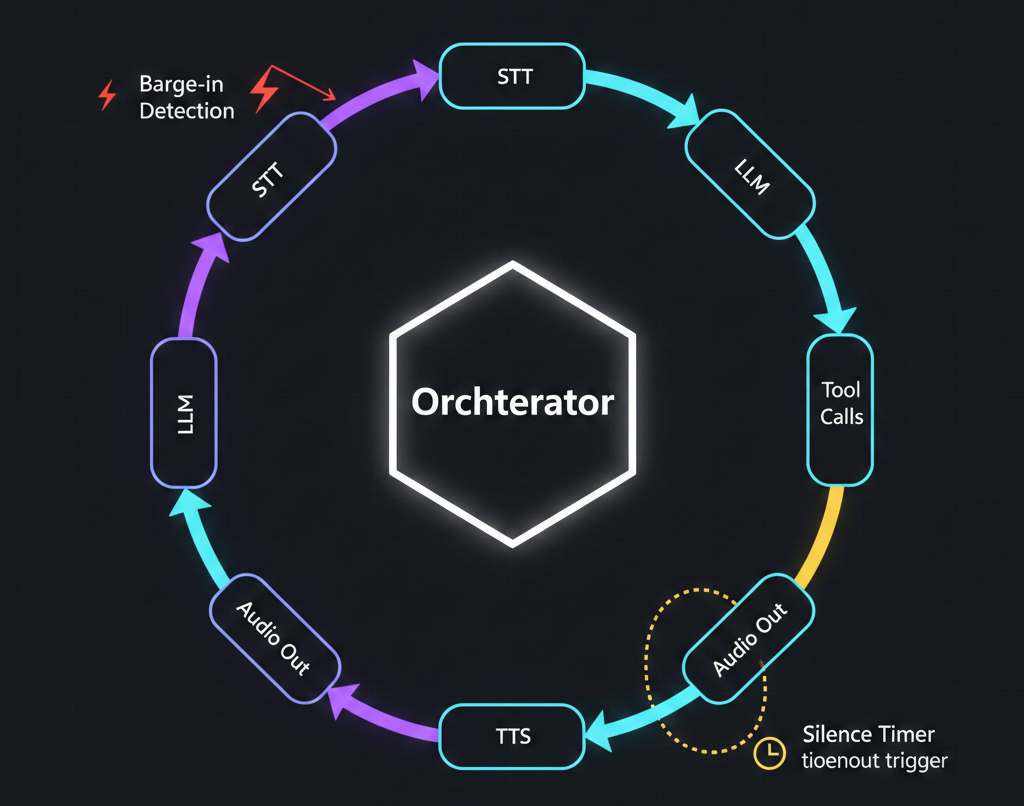
Conversation state management. Tracking the full conversation history, current context, pending tool calls, and where the system is in a multi-turn dialogue. The orchestrator maintains state across all the streaming components so that when the user interrupts or the LLM calls a tool, nothing gets lost.
Interruption handling (barge-in). This is one of the hardest problems. When the AI is mid-sentence and the user starts talking, the orchestrator needs to: stop the TTS audio playback, capture what the user is saying, cancel the in-progress LLM generation, feed the user's interruption plus the conversation context back to the LLM, and start a new response cycle. All in real time. Getting barge-in wrong makes the AI feel robotic and unresponsive. Getting it right is what makes a voice agent feel conversational.
Silence and timeout management. If the user stops talking for 10 seconds, the agent should prompt them. If the call has been silent for 30 seconds, it should end gracefully. If the STT detects background noise but no speech, it should wait rather than treating noise as input. These heuristics seem simple but they're loaded with edge cases.
Error recovery. The TTS API returns a 500. The LLM takes 5 seconds on a response. The caller's audio cuts out for 2 seconds and comes back. The orchestrator handles all of this gracefully — retrying, falling back to backup providers, playing hold messages, or apologizing and asking the caller to repeat themselves.
Tool call coordination. When the LLM decides to call a tool, the orchestrator executes the call, optionally plays a filler message, handles timeouts, and feeds the result back. If the tool call fails, it tells the LLM so it can respond appropriately ("I'm sorry, I wasn't able to check that right now").
Building a robust orchestration layer from scratch is a 3-6 month engineering effort for an experienced team. That's the core value proposition of platforms like VAPI — you get battle-tested orchestration without building it yourself.
The Latency Budget: Anatomy of a Voice Turn
Let's put numbers on a full conversational turn — user speaks, AI responds — and see where the time goes.
| Phase | Duration | Notes |
|---|---|---|
| User speaking | 1-3s | Not "latency" — the user is talking |
| Endpointing detection | 100-300ms | Confirming the user stopped talking |
| STT final transcript | 200-500ms | Final refinement after endpoint |
| LLM first token | 300-800ms | Depends heavily on model choice |
| TTS first audio byte | 200-400ms | Streaming synthesis startup |
| Network/transport | 50-150ms | Higher for telephony, lower for WebRTC |
| Total perceived latency | ~700ms-1.7s | From user silence to AI audio |
The "perceived latency" is what matters — the gap between when the user finishes speaking and when they hear the AI start responding. Under 1 second feels natural. Between 1-2 seconds is acceptable. Over 2 seconds and callers start getting impatient.
How to Optimize
Model selection is the biggest lever. Dropping from GPT-4o to GPT-4o-mini can save 300-500ms per turn. For straightforward voice agents that follow a script and make tool calls, the quality difference is negligible.
Stream everything. Never wait for a complete result from any component. Stream STT partials to start LLM processing early. Stream LLM tokens to TTS before the response is complete. This pipelining can overlap 30-50% of the total processing time.
Speculative processing. Some advanced systems start LLM inference on partial STT results — before the user finishes speaking. If the partial transcript is "I'd like to cancel my," the system might speculatively begin processing. If the final transcript is "I'd like to cancel my appointment," the LLM has a head start. If the user says something unexpected, the speculative result is discarded. This technique is complex to implement but can shave 200-400ms off perceived latency.
Geographic optimization. Run your infrastructure close to your STT, LLM, and TTS providers. An extra 100ms of network latency between your orchestrator and OpenAI's API adds up across three or four round trips per turn.
Warm connections. Keep persistent WebSocket connections to your STT and TTS providers rather than establishing new connections per request. Connection setup overhead is real and avoidable.
Build vs. Buy: When Platforms Make Sense (and When They Don't)
For the vast majority of voice AI deployments, using a platform is the right call. VAPI, Retell, and Bland have spent years optimizing the orchestration layer, handling edge cases, and negotiating pricing with upstream providers. You get a production-ready system in days instead of months.
Use a platform (VAPI, Retell, Bland) when:
- You're building a business application — lead qualification, appointment booking, customer support, outbound campaigns
- Your differentiation is in the conversation design and business logic, not the infrastructure
- You need telephony support (phone numbers, SIP trunks, PSTN connectivity)
- You want to swap STT/LLM/TTS providers without rewriting your stack
- Time to market matters more than per-minute cost optimization
Consider building with open-source frameworks (Pipecat, LiveKit) when:
- You need custom audio processing — real-time translation, speaker diarization, emotion detection
- You're operating at massive scale where platform per-minute fees become a significant cost line
- You have strict data residency or compliance requirements that prevent using third-party orchestration
- You need deep customization of the turn-taking, interruption handling, or streaming pipeline
- You're building a voice AI product (not just using voice AI in a product)
Pipecat (by Daily) is particularly worth watching. It's an open-source Python framework for building real-time voice and multimodal AI pipelines. You define processing stages — STT, LLM, TTS — and Pipecat handles the streaming data flow between them. It gives you VAPI-level orchestration concepts without the platform lock-in, but you're responsible for hosting, scaling, and maintaining it.
LiveKit is another option — an open-source WebRTC infrastructure platform with an AI agent framework built on top. If you're already in the LiveKit ecosystem for real-time communication, their agent framework is a natural extension.
The honest assessment: unless you have a dedicated infrastructure team and a specific technical requirement that platforms can't meet, start with VAPI or Retell. You can always migrate to a custom stack later once you've validated the use case and understand exactly what customization you need.
Where This Is Heading
Voice AI architecture is evolving fast. A few trends worth watching:
Multimodal models with native audio. GPT-4o and Gemini 2.0 can process audio directly — no separate STT step. This collapses the STT + LLM pipeline into a single model call, potentially cutting 200-500ms of latency. The tradeoff today is cost and flexibility (you're locked into one provider for both understanding and reasoning), but this is clearly the long-term direction.
Edge deployment. Running smaller models locally on-device eliminates network latency entirely. This matters less for phone-based agents (the audio already traverses the network) but could be transformative for in-app voice assistants.
Better turn-taking models. Current endpointing is mostly heuristic. Research is moving toward models that understand conversational dynamics natively — knowing that a rising intonation means the speaker isn't done, or that a 400ms pause after "um" is different from a 400ms pause after a complete sentence. This will make voice agents feel significantly more natural.
The architecture pattern described in this article — streaming STT, streaming LLM, streaming TTS, all coordinated by an orchestration layer — is the current state of the art. The individual components will improve and some layers will merge, but the fundamental design of concurrent streaming pipelines with intelligent orchestration is here to stay.
We build voice AI agents on VAPI and custom stacks for businesses that need more than a demo. If you want a hands-on walkthrough, see our VAPI + n8n voice agent tutorial. If you're evaluating voice AI for your use case — whether that's inbound call handling, outbound campaigns, or something more specialized — take a look at our voice agent services or get in touch directly. We'll walk you through what the architecture looks like for your specific requirements.